Last updated: June 12, 2026
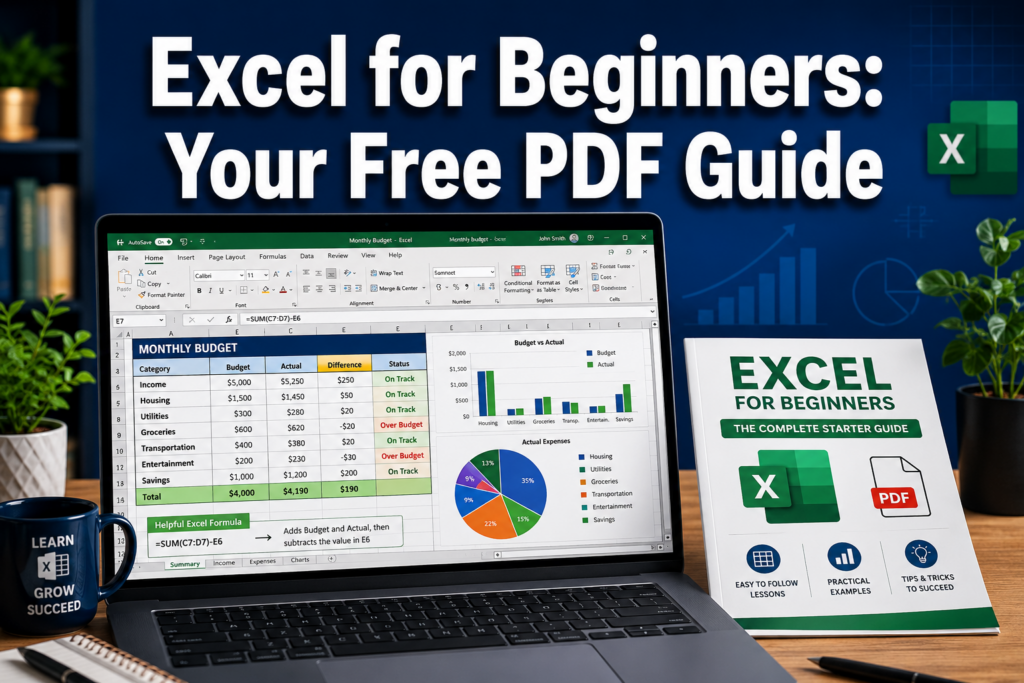
Quick Answer: A “how to use excel for beginners PDF” is a downloadable guide that walks new users through Microsoft Excel’s core features — from entering data and writing formulas to creating charts and formatting cells. Free options are widely available from universities, Excel training sites, and platforms like Udemy. Most beginners can learn the basics in 10 to 20 hours of focused practice.
Key Takeaways
- Free beginner Excel PDF guides are available from universities, dedicated Excel sites, and course platforms — many cost nothing at all.
- Core beginner functions include SUM, AVERAGE, IF, COUNT, and basic cell referencing.
- Most people with zero spreadsheet experience can reach functional Excel competence in two to four weeks of daily practice.
- PDF guides work best when paired with hands-on practice directly in Excel.
- Excel for Mac and Windows are nearly identical in features but differ in some keyboard shortcuts.
- Common beginner mistakes include skipping cell formatting, ignoring keyboard shortcuts, and not saving files regularly.
- Jobs in administration, finance, marketing, retail, and healthcare all regularly list basic Excel as a requirement.
What Are the Basic Excel Functions for Beginners?
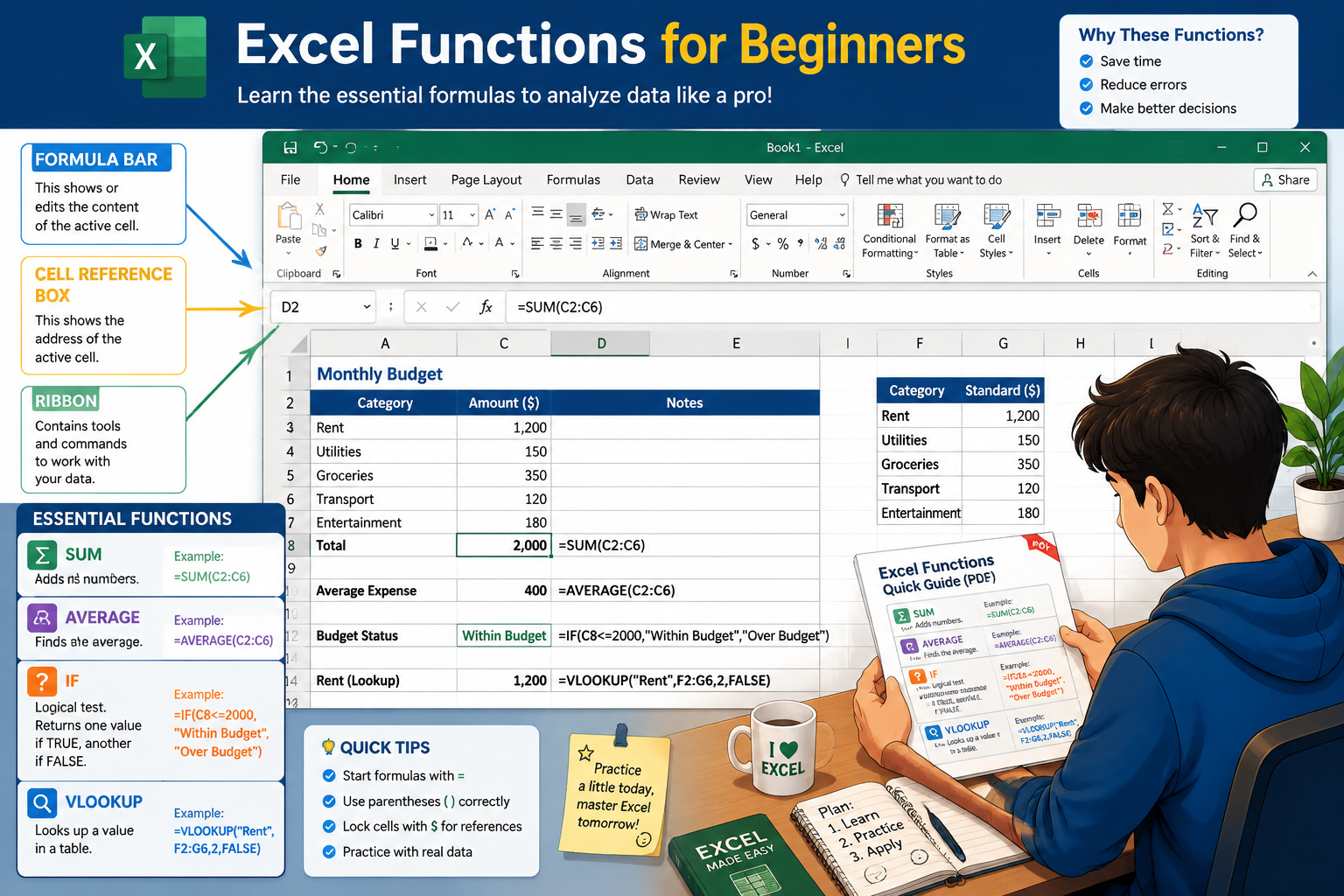
Every beginner needs a small set of core functions before anything else. These six cover the vast majority of everyday spreadsheet tasks:
| Function | What It Does | Example |
|---|---|---|
SUM |
Adds a range of numbers | =SUM(A1:A10) |
AVERAGE |
Calculates the mean | =AVERAGE(B1:B10) |
COUNT |
Counts cells with numbers | =COUNT(C1:C20) |
IF |
Returns one value or another based on a condition | =IF(A1>100,"Yes","No") |
MAX / MIN |
Finds the highest or lowest value | =MAX(D1:D10) |
VLOOKUP |
Searches a table for a matching value | =VLOOKUP(E1,A:B,2,0) |
The University of Florida’s beginner Excel training document emphasizes learning navigation, building basic equations, and resizing columns as the first practical skills to tackle [5]. Once those click, functions like SUM and AVERAGE feel natural.
Common mistake: New users often type a function result manually instead of writing a formula. Always start with = so Excel recalculates automatically when data changes.
For a deeper walkthrough of entering formulas across a full column, see this guide on how to insert a formula in Excel for an entire column.
Free Excel Tutorial PDFs for Absolute Beginners
Several high-quality, free PDF guides exist for beginners who want a structured starting point.
Top free options in 2026:
- ExcelBee’s MS Excel for Beginners Free PDF Ebook — A 20-page guide covering workbook creation, saving, Excel components, and a bonus shortcuts section [3].
- University of Florida Excel Beginners Handout — A practical workshop document covering vocabulary, ribbon usage, keyboard navigation, and status bar modes [5] [10].
- computer-pdf.com’s Excel 2013 Introduction — Teaches everyday skills for building reusable spreadsheets, with a focus on efficient navigation and purposeful formatting [8].
- ResearchGate: Microsoft Excel for Beginner Book 1 — A step-by-step guide covering spreadsheet creation, formatting, and data management for new users [1].
💡 Pro tip: Download two or three PDFs and skim them first. Pick the one whose layout and tone match how you learn best, then stick with it.
These resources pair well with the step-by-step Excel guide for beginners for hands-on reinforcement.
How Much Do Beginner Excel PDF Guides Usually Cost?
Most beginner Excel PDF guides are free. Paid options exist but are rarely necessary for absolute beginners.
- Free: University handouts, ExcelBee’s ebook, computer-pdf.com tutorials, and many blog-based guides [3][5][8].
- Low cost ($10–$20): Udemy’s “Excel for Beginners: Complete Course + 25 PDF Downloads” bundles video lessons with 25 downloadable PDFs — and Udemy frequently discounts courses to under $15 [6].
- Mid-range ($50–$200): Professional association courses like the Maryland Association of CPAs’ Excel formatting course target working professionals who need structured, verifiable training [9].
Choose free PDFs if you’re self-studying casually. Choose a paid course if you need accountability, video demonstrations, or a certificate for a job application.
Is Excel Hard to Learn for Someone With No Computer Background?
Excel is not especially hard for beginners, but it does have a learning curve that feels steeper without prior spreadsheet experience. The interface uses a grid of rows and columns, which is intuitive once you spend an hour or two exploring it.
The ResearchGate “Microsoft Excel for Beginner: Book 1” was designed specifically for people with no prior Excel knowledge, confirming that structured, step-by-step guides make the tool accessible to complete newcomers [1]. The companion Book 2 offers a 14-day practical plan focused on calculations and charts — a realistic timeline for building real confidence [2].
The honest reality: The first session feels unfamiliar. By session three or four, most people are entering data and writing SUM formulas without hesitation.
How Long Does It Take to Learn Basic Excel Skills?
Most beginners reach functional competence — enough to build simple spreadsheets, use basic formulas, and format data — in 10 to 20 hours of focused practice spread over two to four weeks.
The University of Florida’s beginner workshop is structured as a 2-hour introduction that covers navigation, equations, and column resizing [5]. That’s enough to get started, but not enough to feel confident. Plan for:
- Week 1: Interface orientation, data entry, SUM/AVERAGE formulas
- Week 2: Formatting, IF function, basic charts
- Week 3–4: VLOOKUP, sorting/filtering, printing and sharing files
If you want to compress that timeline, the how to learn MS Excel in 24 hours guide offers a structured intensive approach.
Can I Learn Excel by Myself With a PDF Guide?
Yes — self-teaching with a PDF guide works well, especially when combined with direct practice in Excel. PDF guides provide structure and reference material, but the real learning happens when you apply each concept immediately in a live spreadsheet.
The thebricks.com step-by-step Excel PDF guide (published February 2025) specifically emphasizes practical, hands-on learning as the most effective approach for self-study [7]. A good workflow:
- Read one section of the PDF.
- Open Excel and replicate exactly what the guide shows.
- Modify the example slightly (change numbers, add a column) to test understanding.
- Move to the next section only after the current one feels solid.
This is more effective than reading the entire PDF first and then trying to practice from memory.
Excel Shortcuts That Save Time for Beginners
Keyboard shortcuts cut repetitive clicking and speed up every task. These are the most useful ones for new users:
| Shortcut (Windows) | Shortcut (Mac) | Action |
|---|---|---|
Ctrl + S |
Cmd + S |
Save file |
Ctrl + Z |
Cmd + Z |
Undo |
Ctrl + C / Ctrl + V |
Cmd + C / Cmd + V |
Copy / Paste |
Ctrl + Home |
Cmd + Home |
Go to cell A1 |
Ctrl + End |
Cmd + End |
Go to last used cell |
Alt + = |
Cmd + Shift + T |
AutoSum |
F2 |
F2 |
Edit active cell |
Ctrl + A |
Cmd + A |
Select all |
For more shortcut techniques, the guide on selecting the entire worksheet using only shortcut keys is a practical next step.
Differences Between Excel for Mac and Windows
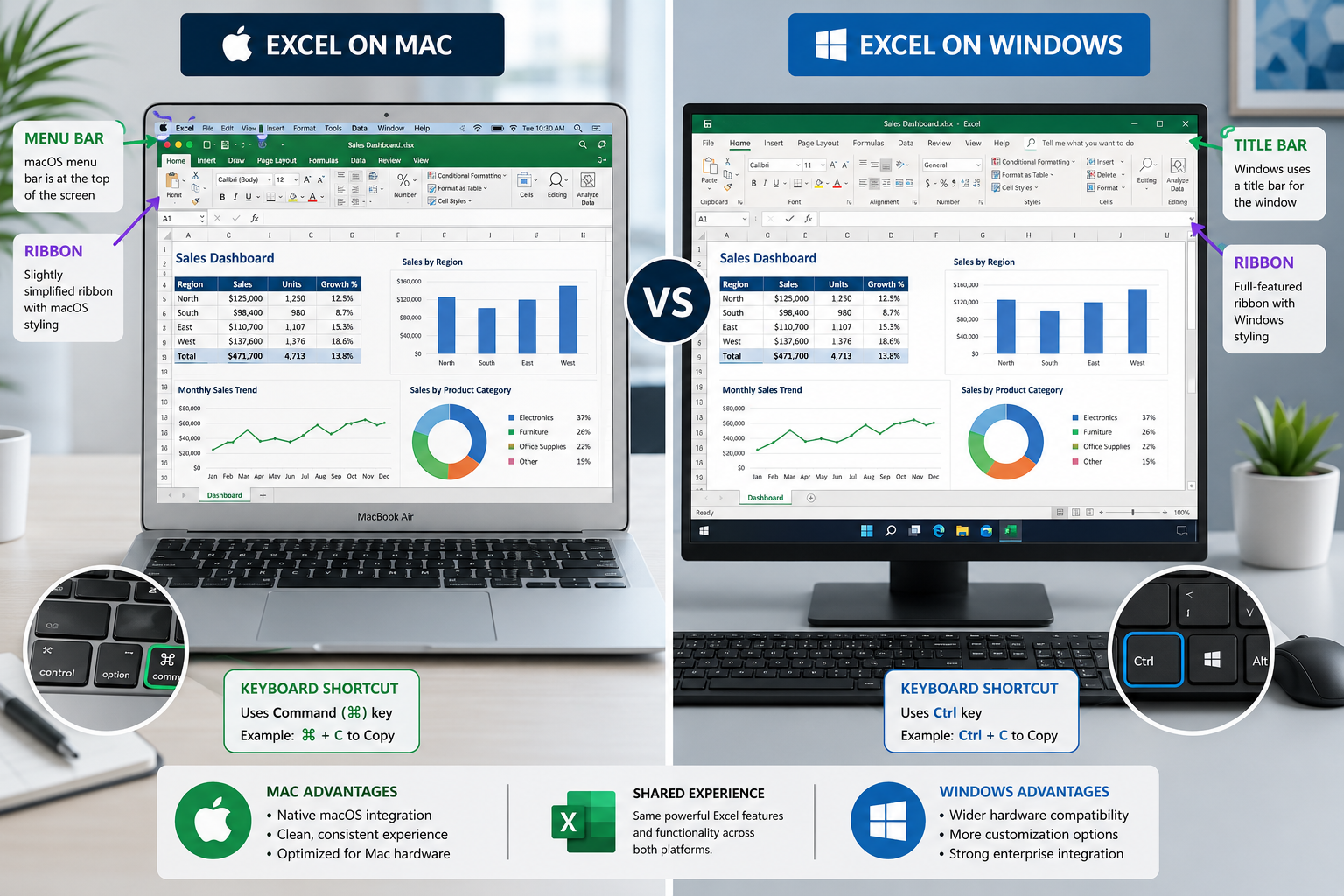
Excel for Mac and Windows share the same core features, but there are meaningful differences beginners should know about.
Key differences:
- Keyboard shortcuts: Windows uses
Ctrl; Mac usesCmd. Some Windows shortcuts have no direct Mac equivalent. - Interface layout: The Mac version has a slightly different ribbon and uses the Mac menu bar at the top of the screen rather than inside the Excel window.
- File compatibility:
.xlsxfiles open correctly on both platforms with no conversion needed. - Some advanced features: A small number of Power Query and macro features behave differently on Mac, though this rarely affects beginners.
For day-to-day beginner tasks — entering data, writing formulas, making charts — the experience is nearly identical on both platforms.
What Mistakes Do New Excel Users Typically Make?
The most common beginner mistakes are predictable, and knowing them in advance saves a lot of frustration.
Top mistakes to avoid:
- Not saving frequently. Excel can crash. Use
Ctrl + S(orCmd + S) every few minutes, or enable AutoSave if using Microsoft 365. - Mixing data types in a column. Putting text in a column of numbers breaks formulas. Keep each column consistent.
- Skipping cell formatting. Unformatted numbers are hard to read. Apply number, currency, or percentage formats early.
- Hard-coding values into formulas. Writing
=A1+500instead of referencing another cell makes the spreadsheet fragile and hard to update. - Ignoring the formula bar. Beginners often try to edit formulas directly in the cell. The formula bar at the top is cleaner and less error-prone.
- Not using Undo.
Ctrl + Zreverses almost any mistake instantly.
For formatting specifically, the Maryland Association of CPAs course covers cell formatting, quick formatting tools, and template creation — all useful for avoiding messy spreadsheets from the start [9].
What Jobs Require Basic Excel Knowledge?
Basic Excel skills appear in job listings across nearly every industry. Employers typically define “basic” as data entry, SUM/AVERAGE formulas, sorting, filtering, and simple formatting.
Common roles that list basic Excel:
- Administrative assistant / office coordinator
- Bookkeeper or accounts payable clerk
- Marketing coordinator
- Retail store manager
- Healthcare billing and coding
- Customer service representative
- Project coordinator
- HR assistant
Learning Excel also opens doors to more advanced tools. For example, building a balance sheet template in Excel is a skill directly relevant to accounting and finance roles.
Are Online Excel Courses Better Than PDF Guides?
Neither is universally better — the right choice depends on how you learn. PDF guides are free, flexible, and great for reference. Online courses add video demonstrations, structured progression, and sometimes quizzes or certificates.
Choose a PDF guide if:
- You prefer reading at your own pace.
- You want a quick reference to return to later.
- Budget is a concern.
Choose an online course if:
- You learn better by watching someone perform each step.
- You want a certificate to show an employer.
- You benefit from a structured curriculum with checkpoints.
Udemy’s “Excel for Beginners: Complete Course + 25 PDF Downloads” combines both formats — video lessons plus 25 downloadable PDF guides — making it a strong middle-ground option [6].
Best Excel Learning Resources for Students
Students benefit most from free, structured resources that align with academic or workplace tasks.
Top picks for students in 2026:
- ExcelBee’s free PDF ebook — Covers all essentials in 20 pages, ideal for a quick-start reference [3].
- University of Florida Excel handout — Designed for a 2-hour workshop, clear and jargon-free [5].
- ResearchGate Book 1 and Book 2 — Together they form a practical 14-day learning path [1][2].
- cours-bureautique.fr free illustrated PDFs — Covers beginner through advanced topics including pivot tables and shortcuts, with illustrated examples [4].
- Mark’s Excel Tips — Practical tutorials on real-world tasks like building a colorful weekly lesson planner in Excel or a monthly food budget template.
Students doing coursework in business, science, or social sciences will find Excel especially useful for organizing research data, building budgets, and presenting findings in charts.
FAQ
Q: Where can I download a free how to use excel for beginners PDF? The University of Florida’s Excel Beginners handout, ExcelBee’s free 20-page ebook, and computer-pdf.com’s Excel introduction are all free to download. Search for any of these by name to find the current download links.
Q: Is Microsoft Excel free? Excel requires a Microsoft 365 subscription (starting around $7/month as of 2026) or a one-time purchase of Microsoft Office. A free browser-based version is available at office.com with a free Microsoft account, though it has fewer features than the desktop app.
Q: What version of Excel should a beginner use? Any version from Excel 2016 onward works well for beginners. Excel 365 (the subscription version) gets the most frequent updates and includes all current features, but the core beginner skills are identical across versions.
Q: Can I use a PDF guide offline? Yes. Download the PDF to your device and open it with any PDF reader. This is useful when practicing without an internet connection.
Q: How do I save an Excel file as a PDF? Go to File > Save As > and choose PDF from the format dropdown. This is useful for sharing spreadsheets with people who don’t have Excel.
Q: What’s the difference between a workbook and a worksheet? A workbook is the entire Excel file. A worksheet (also called a “sheet” or “tab”) is a single grid within that file. One workbook can contain many worksheets.
Q: Do I need to know math to use Excel? No. Excel handles the calculations. You just need to know which function to use and which cells contain the data. Basic arithmetic understanding helps, but advanced math is not required for beginner tasks.
Q: How do I fix a #VALUE! error in Excel? This error usually means a formula is trying to perform a math operation on a cell that contains text instead of a number. Check that all cells in your formula range contain the correct data type.
Q: Can Excel PDFs teach me pivot tables? Some intermediate-level PDFs do cover pivot tables. The cours-bureautique.fr collection includes pivot table content for learners who have moved past the basics [4]. Most beginner PDFs stop before pivot tables.
Q: Is Google Sheets a good alternative to Excel for beginners? Google Sheets is free and browser-based, making it accessible with no software installation. The core functions (SUM, AVERAGE, IF, etc.) work the same way. Most beginner Excel PDF skills transfer directly to Sheets.
Conclusion
Getting started with Excel doesn’t require expensive software training or a technical background. A solid “how to use excel for beginners PDF” — many of which are completely free — gives new users a structured path from opening a blank spreadsheet to writing formulas, formatting data, and building simple charts.
Actionable next steps:
- Download one free PDF guide (ExcelBee or the University of Florida handout are good starting points).
- Open Excel (or the free browser version at office.com) and follow along with the guide in real time.
- Practice the six core functions: SUM, AVERAGE, COUNT, IF, MAX/MIN, and VLOOKUP.
- Learn five keyboard shortcuts this week — starting with
Ctrl + S,Ctrl + Z, andAlt + =. - Build something real: a personal budget, a grade tracker, or a simple inventory list. Real projects make skills stick.
For a complete hands-on foundation, the how to use Excel for beginners guide at Mark’s Excel Tips is a practical companion to any PDF you choose.
References
[1] Microsoft Excel for Beginner Book 1 – https://www.researchgate.net/publication/373299857_Microsoft_Excel_for_Beginner_Book_1?utm_source=openai
[2] Microsoft Excel for Beginner Book 2 – https://www.researchgate.net/publication/373707617_Microsoft_Excel_for_Beginner_Book_2?utm_source=openai
[3] MS Excel for Beginners Free PDF Ebook – https://www.excelbee.com/ebooks/ms-excel-for-beginners-free-pdf-ebook?utm_source=openai
[4] Cours Excel en PDF — cours-bureautique.fr – https://www.cours-bureautique.fr/ressources/cours-excel/pdf/?utm_source=openai
[5] Excel Beginners — University of Florida – https://media.news.health.ufl.edu/misc/training/Handouts/Zoom/Excel/Excel-Beginners.pdf?utm_source=openai
[6] Excel for Beginners: The Complete Guide to Excel Basics — Udemy – https://www.udemy.com/course/excel-for-beginners-the-complete-guide-to-excel-basics/?utm_source=openai
[7] Guide: How to Use Excel Step by Step PDF — thebricks.com – https://www.thebricks.com/resources/guide-how-to-use-excel-step-by-step-pdf?utm_source=openai
[8] Microsoft Excel 2013 Part 1: Introduction — computer-pdf.com – https://www.computer-pdf.com/microsoft-excel-2013-part-1-introduction?utm_source=openai
[9] Excel — Formatting Spreadsheets for Beginners — MACPA – https://macpa.org/catalog/on-demand/20019744-excel-formatting-spreadsheets-for-beginners?utm_source=openai
[10] Excel 2016 Beginners — Microsoft Tech Community – https://techcommunity.microsoft.com/gxcuf89792/attachments/gxcuf89792/ExcelGeneral/113914/1/Excel2016-Beginners.pdf?utm_source=openai